
FR DEB/EMEBI Generator
Build the French EMEBI survey + état récapitulatif TVA (intra-EU goods) in DGDDI format - you file
Want FR DEB/EMEBI Generator installed and configured for you? Onboarding Pack: $350 one-off
Support plans from $425 a month
EMEBI and the VAT recapitulative statement from your invoices
Intra-EU dispatches and arrivals collected per month with CN8 code, net mass, value in euros, regime and nature, validated line by line and written as CSV and DEBWEB files
Pick a month and a flow: the collection reads the posted invoices (dispatch) or vendor bills (arrival) of EU partners, one line per goods line with its CN8 code and country of origin from the product, the statistical value in euros from the company-currency amount, the net mass converted to the product unit, and your default regime, nature of transaction, transport mode, incoterm and department. Validation lists every anomaly before the files are written; credit notes and lines that may not be declared are kept visible but left out of the file. The VAT recapitulative statement is aggregated per acquirer VAT number from the dispatch declaration.
Key features
Collect from invoices
Posted customer invoices or vendor bills of the month, EU partners only (optional), goods lines only. Credit notes come in with a negative value.
Line data
CN8 code and country of origin from the product when the Delivery app is installed (HS code field), otherwise entered on the line; statistical value in euros; net mass from the product weight converted to the product unit.
Defaults per run
Regime, nature of transaction, transport mode, incoterm and department are set once in the collection wizard and editable per line.
Validation
CN8 length, EU member state, mandatory positive value, nature valid for the flow, regime matching the flow, metropolitan department, acquirer VAT format: every anomaly is listed before the declaration can be validated.
Files
A CSV and a fixed-width DEBWEB text file with the lines that may be declared; lines left out (credit notes, zero values) are counted and shown with their reason.
VAT recapitulative statement
Aggregated per acquirer VAT number and regime from the dispatch declaration, validated and written as CSV. The reply deadline (10th working day of the next month) is on each declaration.
Screenshots
Odoo 19.0 with the data of a window and door manufacturer in Lyon, English interface; the same screens apply to Odoo 18.0 and 20.0.
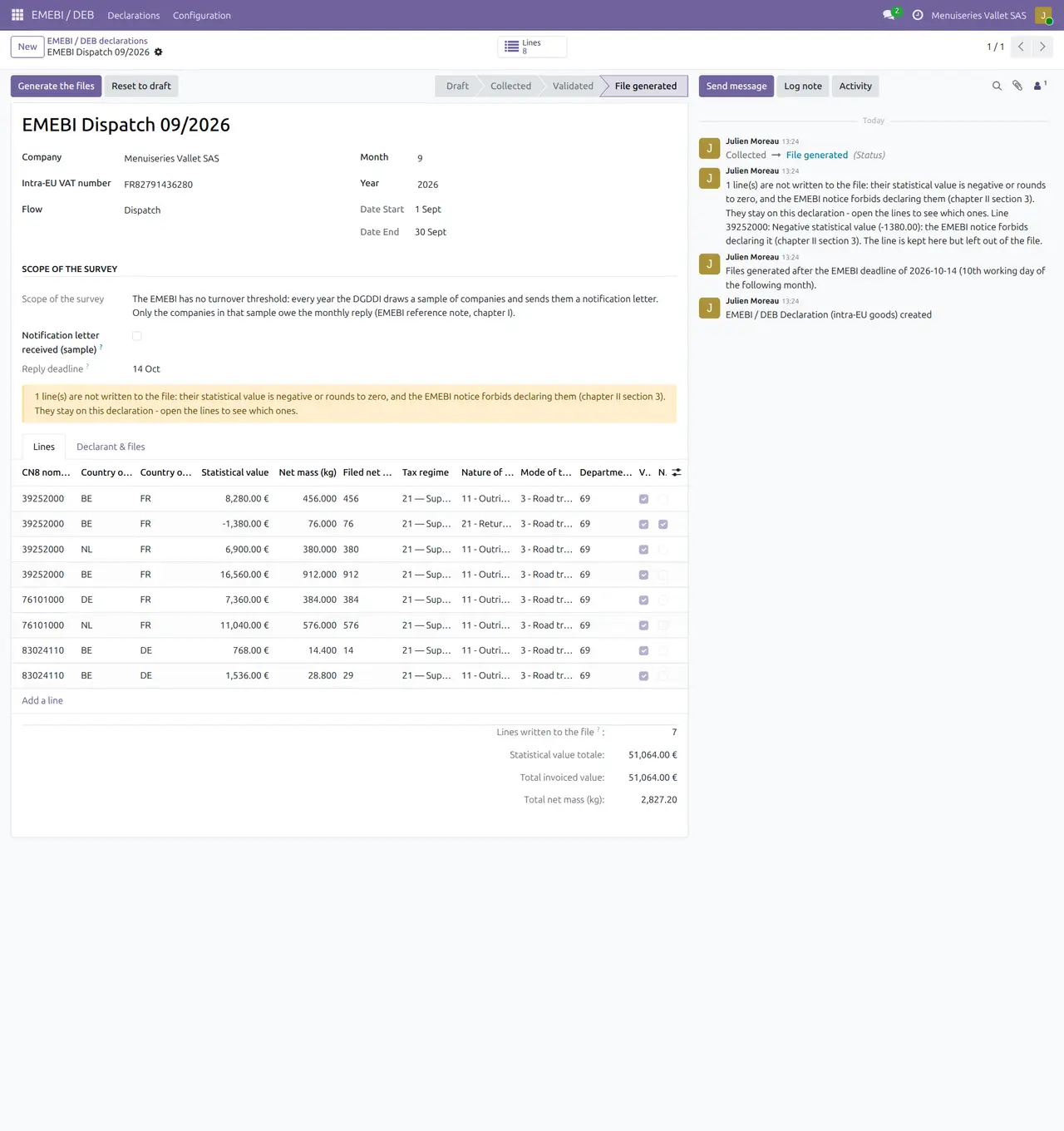
1. Dispatch declaration of September
Eight lines from invoices to Belgium, the Netherlands and Germany with CN8, mass and value; the credit note stays visible but is not filed.
2. VAT recapitulative statement
Amounts per acquirer VAT number and regime, aggregated from the dispatch declaration.

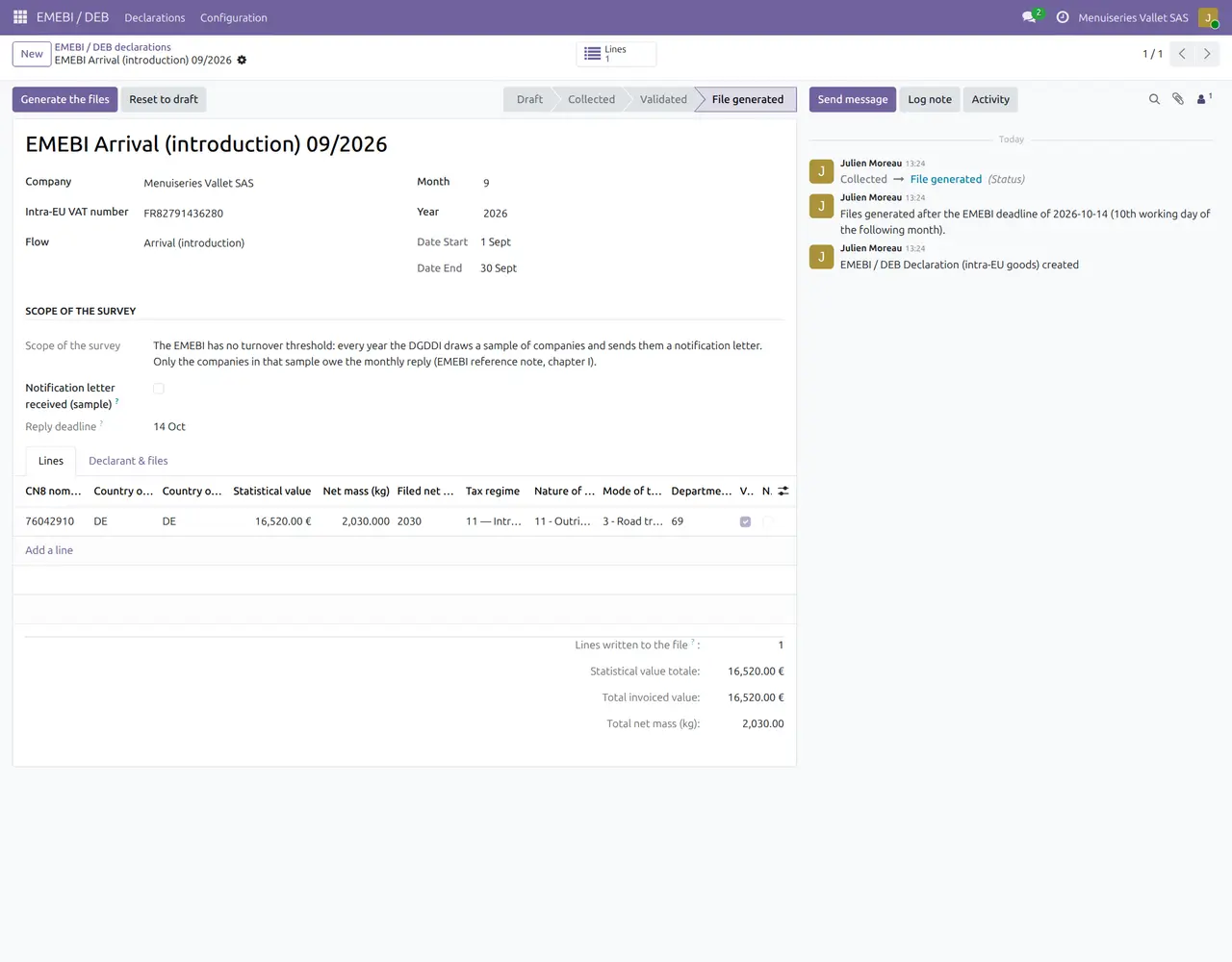
3. Arrival declaration
Aluminium profiles bought from the German parent, regime 11.
4. Natures of transaction
The codes and the flow each one applies to.

Why this app
✓ The declaration starts from what was invoiced, not from a spreadsheet.
✓ Anomalies are listed before the file exists, not after the portal rejects it.
✓ Values in euros from the accounting amounts, mass from the product weight.
✓ Credit notes are shown and left out, as the notice asks.
Get started
Products
Give goods their HS / CN8 code, origin and weight.
Collect
Create the declaration of the month and flow, run Collect flows with your defaults.
Validate
Correct the anomalies and validate.
Files
Generate the files and the VAT recap, then file on DEBWEB.
Questions
Does the module file on DEBWEB?
No. It writes the files and the figures; you file on the customs portal.
Where do CN8 codes come from?
From the product HS code when the Delivery app is installed; otherwise they are entered on the lines.
En français
FR DEB/EMEBI Generator prépare l'EMEBI (expéditions et introductions) et l'état récapitulatif TVA à partir des factures validées : NC8, masse nette, valeur en euros, régime et nature, contrôlés ligne par ligne.
- Collecte mensuelle depuis les factures et factures fournisseurs, partenaires UE
- NC8 et origine depuis l'article, masse convertie, valeur en euros
- Contrôle des anomalies avant validation
- Fichiers CSV et DEBWEB, avoirs visibles mais non déclarés
- État récapitulatif TVA par numéro de TVA de l'acquéreur
Specifications
- This page: Odoo 19.0 (also available for Odoo 18.0 and 20.0), Community and Enterprise
- License: OPL-1
- Languages: English, French
- Depends on: account
- Optional: Delivery (stock_delivery) for the HS code and country of origin on products
- Author: Pokutsoft, pokutsoft.com
- Support: support@pokutsoft.com
Update date: 2026-10-30 · Version: 19.0.1.4.12
User guides (PDF)
Related modules

FR DES - Déclaration
Build the French DES (Déclaration Européenne de Services) per client/period in DGDDI format

FR Loi Anti-Fraude TVA
Guided self-assessment + evidence pack proving anti-fraud VAT law compliance (we document, not certify)

FR Prélèvement Source
Reconcile income-tax-at-source (PAS) withheld vs DSN remittance with an employer control worksheet