
DE Report-Versand
Schedule any saved report (PDF/XLSX) to be e-mailed automatically to recipients on a recurring German business calendar.
Want DE Report-Versand installed and configured for you? Onboarding Pack: $350 one-off
Support plans from $425 a month
Send any PDF report by e-mail on a German business calendar
Weekly, monthly or quarterly schedules, moved around weekends and nationwide holidays, with PDF and XLSX attachments and a send log
Pick a QWeb PDF report and a record filter, choose the rhythm and the send time in your time zone, and the report goes out by e-mail: one collective mail to all recipients, or one mail per record to the record's own contact. A send date that falls on a weekend or a nationwide German holiday moves to the previous or next working day. Every run is logged with its attachments.
Key features
Rhythm and send time
Daily, weekly on a weekday, monthly or quarterly on a day of the month, at a send time in the schedule's own time zone. The plain-text line shows the rule, for example "Jeden Montag um 07:30 Uhr".
German business calendar
A send date on Saturday, Sunday or a nationwide holiday (Neujahr, Karfreitag, Ostermontag, 1. Mai, Christi Himmelfahrt, Pfingstmontag, 3. Oktober, both Christmas days) moves to the previous or next working day, plus an optional offset in days.
Report and records
Any report of type QWeb PDF with a record filter (domain) on its model. The filter is checked when it is saved.
XLSX next to the PDF
Optionally the filtered records as an XLSX sheet with your own columns, dotted paths such as partner_id.name allowed; each column is checked against the model.
Two send modes
One collective mail to contacts and free addresses, or one mail per record to the contact found in a field of your choice (for example each customer receives his own invoice copy).
CC and BCC
CC is added to the mail; every BCC address receives its own copy with the same attachments and is never shown to the other recipients.
Check before the first run
Konfiguration pruefen warns about missing recipients, an empty or invalid filter, a missing recipient field and a report that produces no PDF. Naechste Termine lists the coming eight send dates.
Send log
Each run is logged as Versendet, Uebersprungen (no records) or Fehler with recipients, record count, attachments and the delivery error of the mail server. Success rate per schedule.
Screenshots
Odoo 19.0 with the data of a German electrical wholesaler (Stuttgart); the same screens apply to Odoo 18.0 and 20.0.
1. Schedule
Invoice report every Monday at 07:30 Berlin time, next working day rule, holidays, CC, BCC and the XLSX columns.

2. All schedules
Rhythm, next and last run, status, sent and failed runs and the success rate.

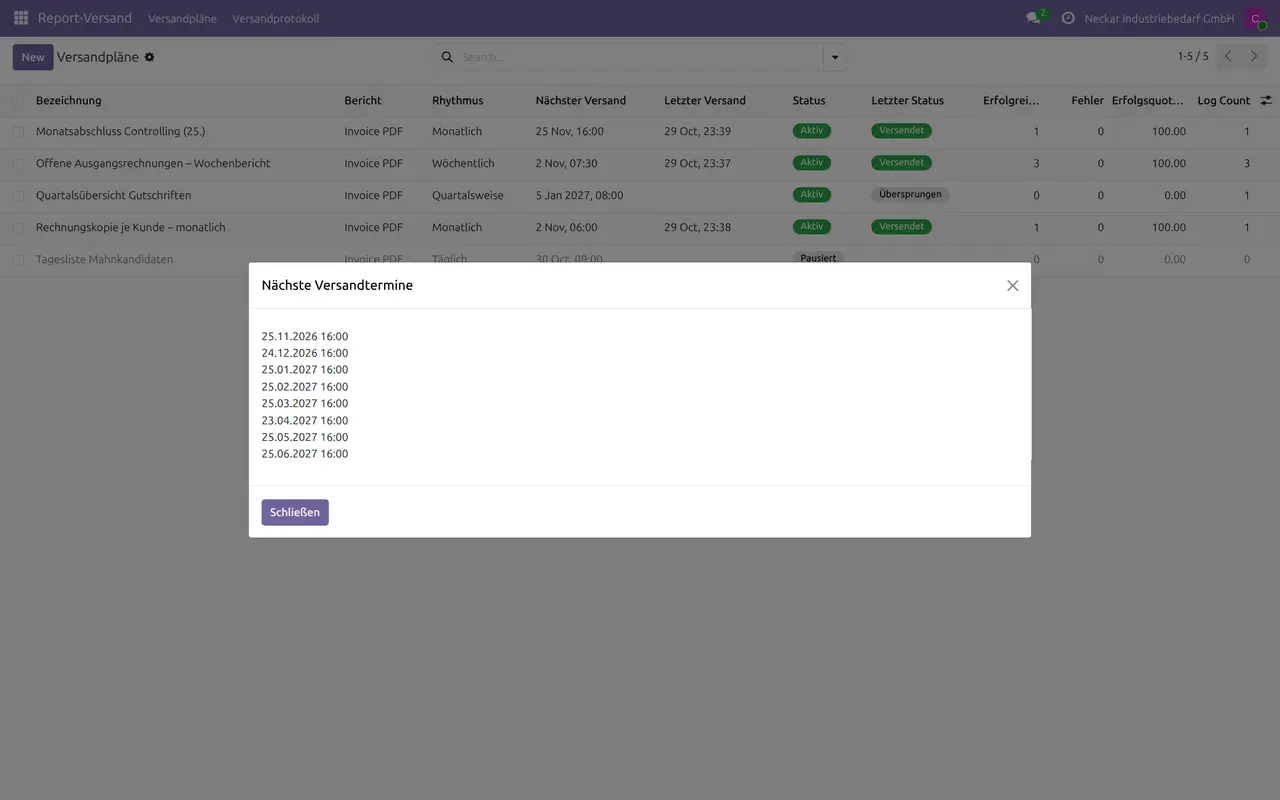
3. Next send dates
Monthly on the 25th: 25 December 2026 is a holiday, the report goes out on Thursday 24 December.
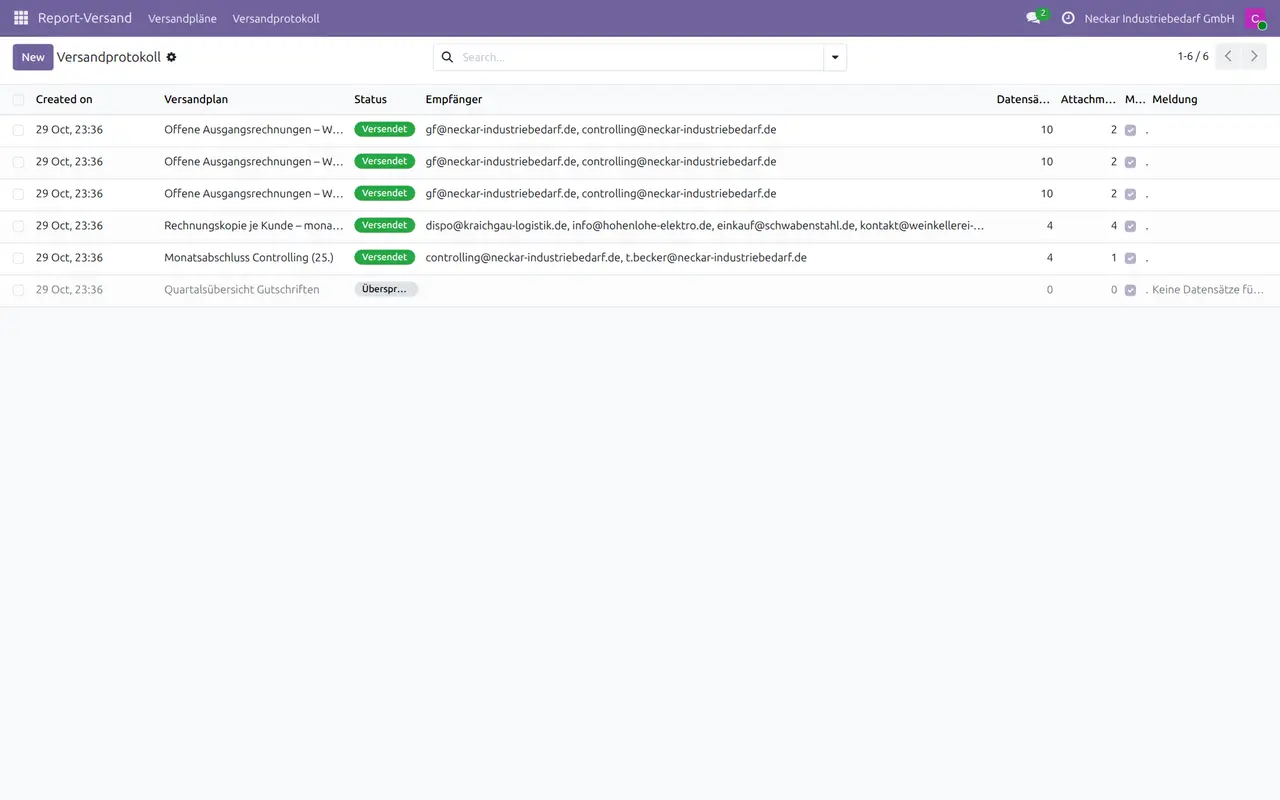
4. Send log
Manual and scheduled runs with recipients, record count and status.
Why this app
✓ The same report reaches the same people every week without anyone clicking Print.
✓ Send dates follow German working days instead of landing on a holiday.
✓ Every run is traceable with the exact attachments that went out.
✓ Works with every PDF report you already have in Odoo.
Get started
Report
Create a schedule and pick the PDF report and a record filter.
Rhythm
Choose daily, weekly, monthly or quarterly, the send time and the working-day rule.
Recipients
Add contacts and addresses, or let each record mail its own contact.
Check
Run Konfiguration pruefen and Naechste Termine; Jetzt senden for a first test.
Questions
Which holidays are used?
The nine holidays valid in every German state. Regional holidays are not included.
What happens if the mail server rejects the mail?
The log entry is Fehler and shows the server's reason; the next scheduled run tries again.
Auf Deutsch
DE Report-Versand verschickt jeden PDF-Bericht automatisch per E-Mail: täglich, wöchentlich, monatlich oder quartalsweise, verschoben um Wochenenden und bundesweite Feiertage, mit XLSX-Anhang und Versandprotokoll.
- Rhythmus, Uhrzeit und Zeitzone je Versandplan
- Werktagsregel: vorheriger oder nächster Werktag, bundesweite Feiertage, Vorlauf/Nachlauf in Tagen
- Sammel-E-Mail oder eine E-Mail je Datensatz an dessen Kontakt
- CC und BCC; jede BCC-Adresse erhält eine eigene Kopie
- XLSX-Spalten mit eigenen Überschriften
- Versandprotokoll mit Anhängen, Fehlern des Mailservers und Erfolgsquote
Specifications
- This page: Odoo 19.0 (also available for Odoo 18.0 and 20.0), Community and Enterprise
- License: OPL-1
- Languages: English, German
- Depends on: mail
- XLSX attachments use the Python package xlsxwriter (part of the standard Odoo installation)
- Author: Pokutsoft, pokutsoft.com
- Support: support@pokutsoft.com
Update date: 2026-10-30 · Version: 19.0.1.1.8
User guides (PDF)
Related modules

DE Belegerfassung Inbox
Drop bills/receipts into an inbox, parse them with the customer's own OCR key (BYOK), and create draft German vendor bills with VAT and SKR account mapping.

DE Budgetplanung +
Community budgeting with Plan-vs-Ist (actual) dashboards per account and Kostenstelle (cost centre) for the German market.

DE Finanz-Dashboard +
Community German finance KPI dashboard: Liquiditaet, Cashflow, OPOS (open items), Umsatzrendite and more - no Enterprise Spreadsheet required.