
DE GoBD Change Journal
Audit-grade who-changed-what change journal over tax-relevant fields (GoBD Protokollierung), exportable for audit defence
Want DE GoBD Change Journal installed and configured for you? Onboarding Pack: $350 one-off
Support plans from $425 a month
Who changed what, when: the GoBD change journal
An append-only journal of every change to tax-relevant fields, with snapshots on posting and a CSV or HTML export for the auditor
GoBD asks that changes to tax-relevant data stay traceable. Odoo's chatter shows some of them, scattered over records. This app writes one entry per change of a watched field, with old value, new value, user and time, into a journal that cannot be edited or deleted, and takes a snapshot of every journal entry when it is posted.
What you get
Watched fields you choose
Ten rules are shipped: entry number, date, partner, reference, total and status of journal entries, account, debit and credit of journal items, VAT number of partners. Add or switch off rules per field.
Create, change, delete
Each rule logs creation, change and deletion separately; computed stored fields such as debit, credit and total are compared too, so a corrected amount appears as old and new value.
Only after posting
Rules on the journal entry can be limited to posted entries, so typing in a draft does not fill the journal.
Append-only
Journal entries cannot be edited or deleted by anyone, administrators included.
Snapshot on posting
Every posted entry gets a snapshot of its watched fields; the snapshot shows the difference to the current values.
Summary per user
Number of creates, changes and deletes per user and model, with the last change.
Export for the auditor
Filter by period, user, model and operation; download CSV or a printable HTML report.
On the journal entry
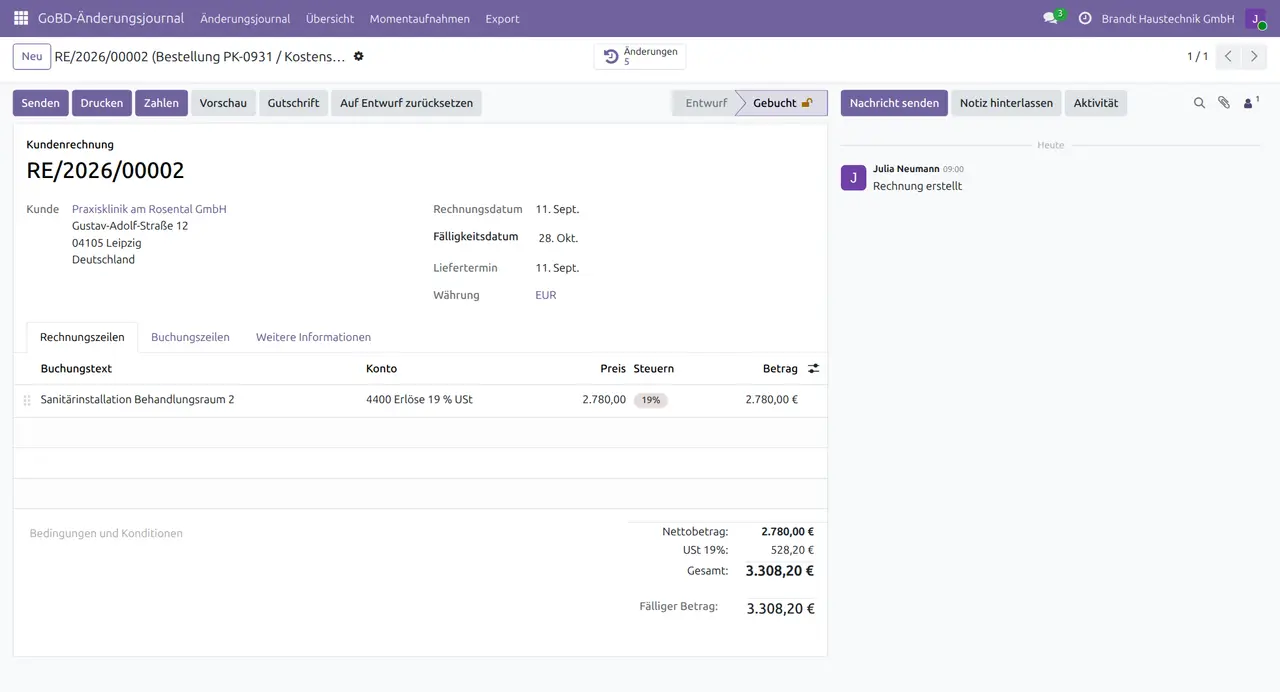
A Changes button on every journal entry opens its history, lines included.
Screenshots
Odoo 19.0 with German user interface and example data of a German company.
1. Change journal, changes only
Who changed which field: references on posted invoices, a vendor bill reset to draft and corrected from 1,980 to 2,080, VAT numbers of two customers.

2. Summary
Creates and changes per user and model.

3. Snapshots
One snapshot per posting, the corrected bill has two.

4. Changes on the invoice
The Changes button opens the history of this entry.
5. Export
CSV built for the selected filter, ready to download.

6. Watched fields
The shipped rules; the manager adds or deactivates fields.

Why this app
✓ Every change of a tax-relevant field is kept with old value, new value, user and time.
✓ The journal itself cannot be altered.
✓ An auditor gets a filtered CSV or HTML trail in seconds.
✓ Internal logging only, nothing is transmitted.
Auf Deutsch
DE GoBD Change Journal protokolliert jede Änderung steuerrelevanter Felder mit altem und neuem Wert, Benutzer und Zeitpunkt in einem unveränderbaren Protokoll.
- Frei wählbare Felder, zehn Regeln vorbelegt
- Anlegen, Ändern und Löschen getrennt protokolliert
- Snapshot jedes gebuchten Buchungssatzes
- Übersicht je Benutzer und Modell
- Export als CSV oder HTML für den Prüfer
Specifications
- This page: Odoo 19.0 (also available for Odoo 18.0 and 20.0)
- License: OPL-1
- Languages: English, German
- Depends on: Accounting (account)
- Journal: append-only, no edit or delete
- Author: Pokutsoft, pokutsoft.com
- Support: support@pokutsoft.com
Update date: 2026-10-28 · Version: 19.0.1.0.17
User guides (PDF)
Related modules

DE Belegnummern Monitor
Monitor gapless German document numbering per journal/company: detect numbering gaps (Lücken), duplicates and prefix/format breaks for the Betriebsprüfung, and protect posted numbers from being renamed.

DE Festschreibung Lock
German monthly Festschreibung: sign-off, immutable period lock, re-open audit trail and a DATEV-export gate (GoBD).

DE GoBD 10-Year
Enforce 6/8/10-year statutory retention on tax-relevant records (Sec. 147 AO / Sec. 257 HGB), block premature deletion, retention dashboard