
EU E-commerce Sync
Import orders and push stock for Lightspeed / CCV / Shopify / WooCommerce stores with Benelux VAT mapping and an OSS worksheet (BYOK)
Want EU E-commerce Sync installed and configured for you? Onboarding Pack: $350 one-off
Support plans from $425 a month
Web-store orders into Odoo with the right Benelux VAT, and the OSS figures
Order import from Shopify, WooCommerce, Lightspeed and CCV Shop exports, VAT mapping per destination and rate, sale orders, stock payloads with your own keys and an OSS worksheet
Paste the order export of your store (Shopify, WooCommerce, Lightspeed eCom, CCV Shop or a generic JSON): each order is staged, matched to a customer and to your products by store SKU, reference or barcode, and its VAT is mapped per destination country and rate. An order whose rate has no mapping is parked with the reason instead of being taxed at the standard rate. Matched orders become Odoo sale orders, stock levels are prepared for the store, and the OSS worksheet totals the cross-border consumer sales per country and rate.
Key features
Order import
Paste one order or a list exported from the store; orders are staged once per store reference and orders older than a chosen date are skipped.
Customer and product matching
Customers by e-mail (created when new), products by the store SKU mapping, the Odoo reference, the barcode or the name.
VAT mapping
A mapping per store, destination country and rate to an Odoo sale tax, checked against the statutory rate; suggested mappings for the company country.
Parked orders
An order without destination country or with a rate that has no mapping stays in error with the reason; it is never posted at another rate.
Sale orders and stock
Matched orders become sale orders (optionally confirmed) with the net or gross price matched to the tax; stock runs prepare the on-hand quantity per SKU and push it with your own API keys.
OSS worksheet
Cross-border consumer sales to other EU member states per country and rate, with the EUR 10,000 threshold check and a CSV export.
Screenshots
Odoo 19.0 with the data of an office-furniture company in Lyon (Lefèvre Mobilier de Bureau SAS), English interface; the same screens apply to Odoo 18.0 and 20.0.
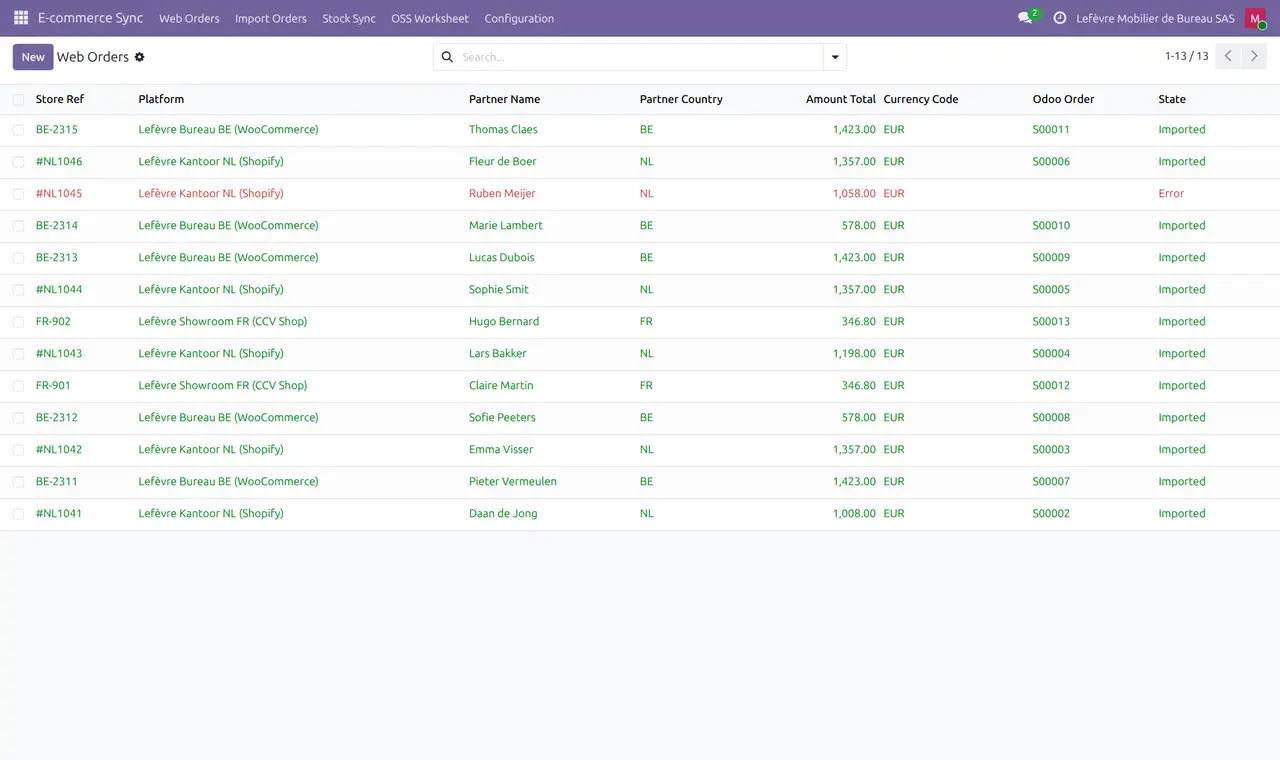
1. Web orders from three stores
Shopify (NL), WooCommerce (BE) and CCV Shop (FR) orders imported as sale orders; one order parked.
2. A parked order
A 9 % line has no VAT mapping for the Netherlands: the order waits with the reason instead of being taxed at 21 %.

3. OSS worksheet Q3
Cross-border consumer sales per country and rate, below the EUR 10,000 threshold.

4. VAT mapping
Destination country and store rate mapped to an Odoo tax, checked against the statutory rate.

5. Stock payload
On-hand quantity per SKU with the store variant id, ready to push with your own keys.

Why this app
✓ Store orders do not reach the books with the wrong country's VAT.
✓ Problems wait in a list with their reason.
✓ Your store keys stay yours (BYOK).
✓ The OSS figures come from the same orders.
Get started
Store
Create the store with its URL and keys.
VAT
Map each destination and rate to an Odoo tax.
Import
Paste the order export and review parked orders.
OSS
Build the OSS worksheet of the quarter.
Questions
Does it pull orders from the store by itself?
No. You paste the store's order export; only the stock push and the connection test call the store, with your keys.
Does it file the OSS return?
No. It prepares the figures and a CSV.
Specifications
- This page: Odoo 19.0 (also available for Odoo 18.0 and 20.0), Community and Enterprise
- License: OPL-1
- Languages: English
- Depends on: sale_management, stock, account
- Store connection: your own API keys (BYOK)
- Author: Pokutsoft, pokutsoft.com
- Support: support@pokutsoft.com
Update date: 2026-10-30 · Version: 19.0.1.1.4
User guides (PDF)
Related modules

EU Cloud Archive BYOK
BYOK archive manifest & FR/BE/NL retention manager for invoices - upload runs via your own job

EU DATEV-style Export
Export FR/BE/NL ledgers in the DATEV-style EXTF layout a German/EU group accountant imports - bookings, masters, SuSa and a cross-border consolidation worksheet
EU EBICS File Drop
Package SEPA (pain.001) / CFONB payment files and parse camt/CFONB statements for the customer's own EBICS client. File packaging only, BYOK transport.